> ## Documentation Index
> Fetch the complete documentation index at: https://developer.tailwind.zone/llms.txt
> Use this file to discover all available pages before exploring further.
# managing the aum
#### we no longer use the [daos.fun](http://daos.fun) wallet browser extension
* this browser extension is no longer supported.
* the [daos.fun](http://daos.fun) wallet browser extension is deprecated.
* you can uninstall this browser extension from your browser.
* if you used to use this browser extension, you have to resetup your admin panel.
* if you see a [daos.fun](http://daos.fun) logo next to your wallet address, you are using the deprecated wallet.
#### setting everything up to trade
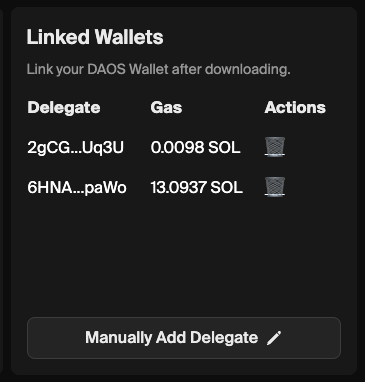
* go to your admin panel while you are logged in with your Creator wallet.
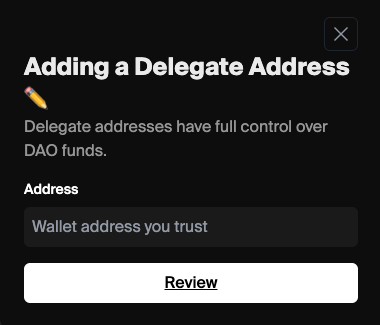
* in the Linked Wallets section, click "manually add delegate"
* paste in your wallet address
* sign the transaction when prompted
* great! now you've linked your wallet.
 #### let's trade!
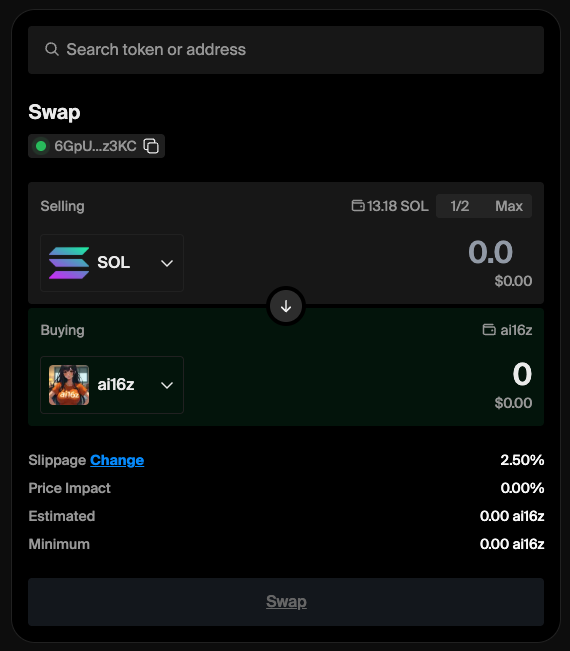
 * click the "trade" button
* swap SPL tokens in a familiar, jupiter-style interface
* click the "trade" button
* swap SPL tokens in a familiar, jupiter-style interface
 ## troubleshooting
* does your signing wallet have gas? keep a small amount of gas in the linked wallet
* do you have the correct wallet connected to daos.fun?
* are you using phantom? works the best
* are you using a reasonable slippage?
* have you tried splitting a larger transaction into multiple smaller transactions? removing decimal places or using smaller size can help.
## additional facts
* we only support trading spl tokens thru the jupiter API-- currently no nfts, perps, defi, or bridging is supported
* all daos spawn only being able to trade jupiter-verified tokens -- you can make a proposal in governance to allow you to trade unverified jupiter SPL tokens.
* you can't withdraw tokens directly from the aum
* you can have up to 3 signers linked to the day -- be aware that each wallet is a full signer and can execute transactions
* the trading experience is good but is not optimized for high-frequency or time-sensitive trading patterns. we suggest avoiding these strategies.
## "Wallet Not Authorized" error
## troubleshooting
* does your signing wallet have gas? keep a small amount of gas in the linked wallet
* do you have the correct wallet connected to daos.fun?
* are you using phantom? works the best
* are you using a reasonable slippage?
* have you tried splitting a larger transaction into multiple smaller transactions? removing decimal places or using smaller size can help.
## additional facts
* we only support trading spl tokens thru the jupiter API-- currently no nfts, perps, defi, or bridging is supported
* all daos spawn only being able to trade jupiter-verified tokens -- you can make a proposal in governance to allow you to trade unverified jupiter SPL tokens.
* you can't withdraw tokens directly from the aum
* you can have up to 3 signers linked to the day -- be aware that each wallet is a full signer and can execute transactions
* the trading experience is good but is not optimized for high-frequency or time-sensitive trading patterns. we suggest avoiding these strategies.
## "Wallet Not Authorized" error
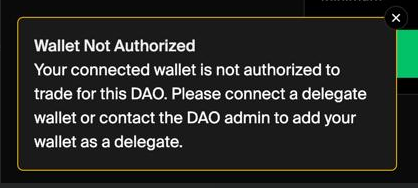 * the most common reason for this error is that you are using the deprecated [daos.fun](http://daos.fun) wallet.
* if you see a [daos.fun](http://daos.fun) logo next to your wallet address, you are using the old wallet.
* to fix this, connect your phantom wallet in the delegated wallet section.
* click the trashcan next to the [daos.fun](http://daos.fun) wallet, you will never need this.
* another reason you may get this error is that you are using a phantom or other wallet that is not delegated.
* delegate the wallet and try again.
* the most common reason for this error is that you are using the deprecated [daos.fun](http://daos.fun) wallet.
* if you see a [daos.fun](http://daos.fun) logo next to your wallet address, you are using the old wallet.
* to fix this, connect your phantom wallet in the delegated wallet section.
* click the trashcan next to the [daos.fun](http://daos.fun) wallet, you will never need this.
* another reason you may get this error is that you are using a phantom or other wallet that is not delegated.
* delegate the wallet and try again.